Table of Contents [expand]
- Postgres Advanced and Classic Postgres
- Heroku Postgres Advanced Features and Components
- Use Cases
- Getting Started Guide
- Heroku Postgres Advanced CLI Commands
- Heroku Postgres Advanced Plan Levels
- Provisioning Heroku Postgres Advanced
- Customizable Features
- Instance Pools
- Version Support
- High Availability
- Connecting to Advanced Databases
- Monitor Your Advanced Database
- Database Usage and Billing
- Maintenance
- Limitations and Considerations
- Support
Last updated October 06, 2026
The Heroku Postgres Advanced tier offers flexible customization options to fit every database needs for your app. The Advanced tier brings increased storage capacity and scalability, decoupled compute and storage, and follower instance pools distributing read load. Manage your databases with the CLI and the web dashboard.
This article covers features on Heroku Postgres Advanced-tier databases. For information on Postgres databases on a different tier, see Heroku Postgres.
Postgres Advanced and Classic Postgres
Classic Postgres databases include the Standard, Premium, Private, and Shield tiers.
We’ll update this table as we add features to the Advanced tier. You can also subscribe to our changelog to stay informed.
| Feature | Advanced | Classic |
|---|---|---|
| Common Runtime | X | X |
| Private and Shield Spaces | X | X |
| Attachments | X | X |
| Credentials | X | X |
| Followers | X | X |
| Forks | X | X |
| Rollbacks | X | X |
| PGSettings | X | X |
| Dataclips | X | X |
| Heroku Connect | X | X |
| Pipelines | X | X |
| Review Apps | X | X |
| Logs | X | X |
| Database Metrics | X | X |
| Plan Changes | X (different mechanism) | X |
| Version Upgrades | X | X |
| Database Maintenance | X | X |
| Trusted IPs for Data | X | X |
| Client-Side Connection Pooling | X | X |
| Managed Logical Replication | X | Not Supported |
| Bring Your Own Encryption Key (BYOK) | Evaluating | X |
| PGBackups | Evaluating | X |
| Server-Side Connection Pooling | To Be Added | X |
| Data Links | To Be Added | X |
| PrivateLink | To Be Added | X |
| mTLS | To Be Added | X |
| Global Clusters | To Be Added | Not Supported |
Advanced-Only Features
These features are only supported on Advanced-tier databases:
Heroku Postgres Advanced Features and Components
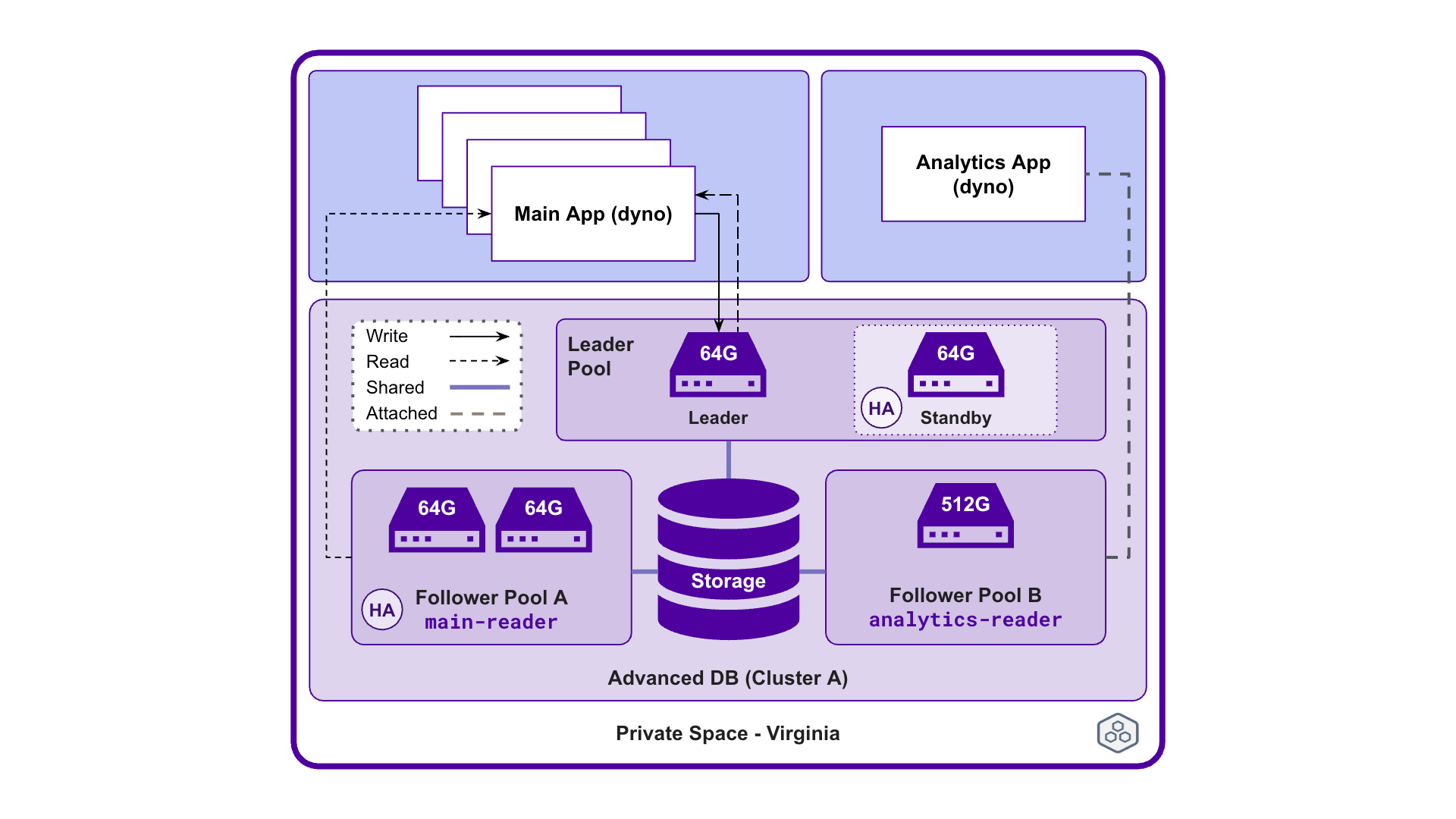
An example implementation of Postgres Advanced databases.
Heroku Postgres Advanced databases are made up of the following components:
- Cluster: An Advanced database is also called a cluster. A cluster comes with one associated storage and one or more compute instance pools. In the diagram, the database cluster has one leader instance pool and two follower instance pools.
- Storage: Each cluster comes with 100 GB of storage included, which is shared across compute instance pools. You can exceed the included storage amount up to 100 TB and set storage quota thresholds to notify if you’re above a certain storage amount.
- Compute Instance Pool: A compute instance pool is either a leader instance pool or a follower instance pool. Each cluster includes a required leader instance pool and optional follower instance pools.
- Compute Instance: Compute instances reside in the compute instance pool and provide the processing power to handle Postgres workloads. Compute instances share the same compute instance size. For example in the diagram,
Follower Pool Ahas two64G-Performanceinstances. - Leader Instance Pool: For each compute pool in a cluster, there’s one required leader instance pool with a leader compute instance that performs read and write operations. There’s also an optional standby instance for high-availability (HA).
- Follower Instance Pool: Optionally, you can create up to five follower instance pools within the cluster to offload read operations from the leader. You can provision one or more compute instances within the follower instance pool. You can name the follower instance pool and find it in the config var, for example
main-reader. - High Availability (HA): In the leader instance pool, having a leader instance and its standby instance enables high availability. In a follower instance pool, having at least two follower instances enables HA in that instance pool.
Use Cases
You can use Advanced databases if you currently use Heroku Postgres Standard, Premium, Private or Shield databases. Here are some examples of use cases for Advanced databases:
Use Advanced databases if you have:
- Databases that are constrained because of mismatched storage and compute usage. For example, your app rarely exceeds 20% of load capacity in compute usage, but it’s exceeding 80% of storage capacity. The new Advanced databases have the flexibility to independently scale your compute and storage needs.
- Too many database add-ons to manage. For example, you have different database add-ons for your development, staging, testing, and analytic environments. The new Advanced databases let you consolidate the database add-ons to one cluster, while creating and attaching follower instance pools to your respective apps. This consolidation helps you track database creation and attachments.
- Apps with seasonal spike patterns. For example, your app often exceeds compute and storage capacity during certain months of the year. Instead of upgrading to a larger plan, you can scale using follower instance pools without restarting your application with the new Advanced databases.
- Non-production apps that don’t require high availability. For example, your development app doesn’t need HA like your production app even if they’re both in a Private Space. With the new Advanced databases, you can opt to have a single instance leader configuration to optimize cost.
Getting Started Guide
See our Getting Started Guide on how to create and manage Advanced databases.
Heroku Postgres Advanced CLI Commands
Manage your Heroku Postgres Advanced databases with the data:pg:* CLI commands. See Managing Heroku Postgres using the CLI for more information.
Heroku Postgres Advanced Plan Levels
The Postgres Advanced tier offers default plan levels that you can customize. See Choosing the Right Heroku Postgres Plan for details on the features and plans.
Provisioning Heroku Postgres Advanced
You can provision an Advanced database through interactive CLI prompts or through the command flags. For more information about how to provision an Advanced database, see Provisioning Heroku Postgres Advanced.
To modify a database and its instance pools after provisioning, see Managing Instance Pools on Heroku Postgres Advanced.
Customizable Features
Advanced databases provide flexibility over traditional Heroku Postgres databases by having customization options. For more information about customizable features, see Provisioning Heroku Postgres Advanced.
Instance Pools
In a database cluster, there’s one leader instance pool and optionally up to five follower instance pools. The difference between a leader instance pool and a follower instance pool is that the leader instance pool contains the only writer in the entire cluster, while follower instance pools use all instances for read operations. You can only adjust the compute level in the leader instance pool, but can adjust both the compute level and number of compute instances in a follower instance pool. The compute level is the same across all instances in an instance pool. See Managing Instance Pools on Heroku Postgres Advanced for more information.
Version Support
The PostgreSQL project releases new major versions on a yearly basis. Heroku Postgres supports each major version after testing for compatibility with the platform. For more information about version support on Heroku Postgres, see Heroku Postgres Version Support.
For more information about upgrading the version on your database, see Upgrading the Version of a Heroku Postgres Database.
High Availability
In Advanced databases, high availability is classified as having two or more compute instances within an instance pool. See High Availability on Heroku Postgres for more information.
Connecting to Advanced Databases
For examples on connecting to Heroku Postgres, see Connecting to Heroku Postgres.
Monitor Your Advanced Database
You can view your Postgres Advanced logs with the Heroku CLI, the dashboard, your logging add-on, or in your log drain. You can also install a platform monitoring add-on to help monitor database metrics. See Heroku Postgres Metrics Logs for more information.
Database Usage and Billing
Heroku Postgres Advanced uses different methods of calculating billing depending on the usage. See Usage and Billing on Heroku Postgres Advanced for more information.
Maintenance
From time to time, Heroku performs maintenance tasks on a Heroku Postgres database. Typical tasks include updating the underlying infrastructure of the database. For more information, see Heroku Postgres Maintenance.
Limitations and Considerations
Advanced databases have the following limits:
- A cluster can have up to 5 follower instance pools.
- A cluster can have up to 15 total instances.
- A database can have up to 4,000 tables.
See Connection Limits on Heroku Postgres Advanced for more information on connection limits.
Support
Submit all Heroku Postgres Advanced support and runtime issues via one of the Heroku Support channels.